Feature Pro
Bug reports that explain themselves
"It doesn't work" is where most bug reports start. Then comes the back-and-forth: which browser, what did you click, can you send a screenshot of the console?
On Pro and Agency, StiqNote answers those questions before anyone asks them. Pin a comment on the broken thing, and the report brings what the developer needs.
Included in Pro and Agency. Try it free for 14 days, no card.
What comes with every report
- Console errors and warnings from the page, with how often each one happened.
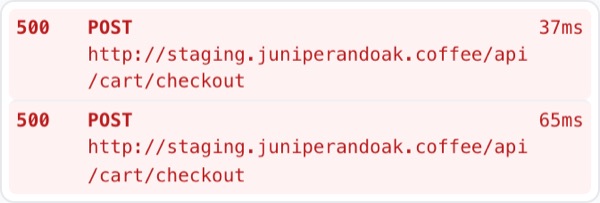
- Network requests: method, address, status and timing, with the failed ones flagged.
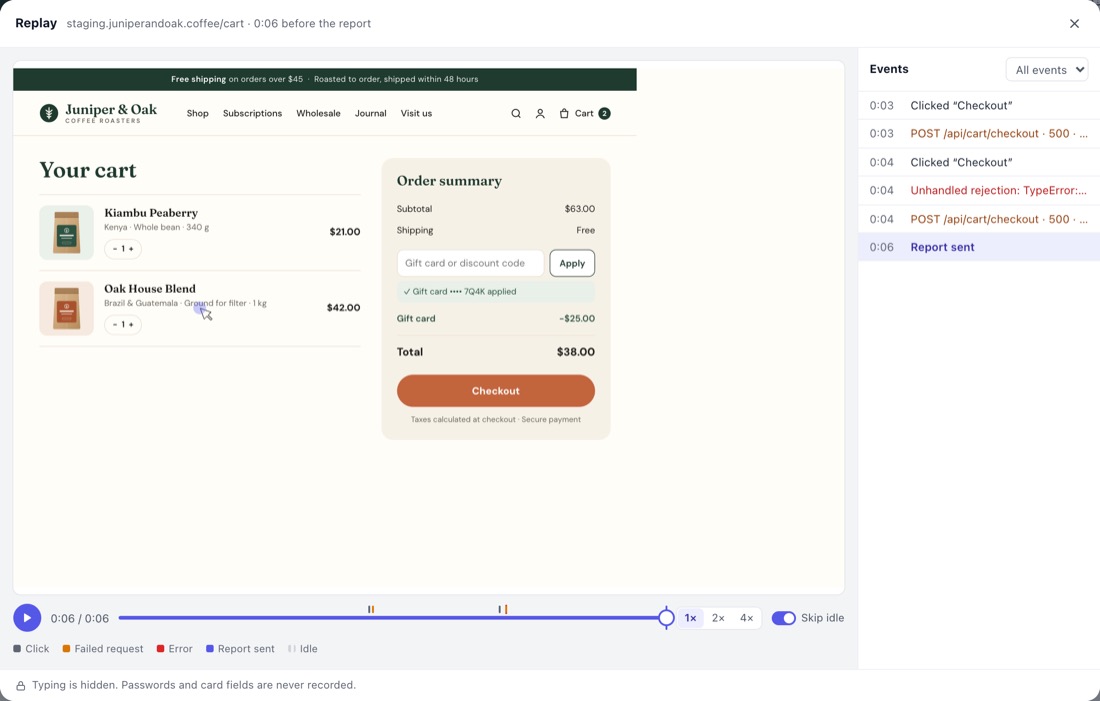
- A replay of the last 3 minutes: clicks, scrolling, navigation and how the page changed, right up to the moment the report was made.
- Browser details: browser, operating system, window and screen size, zoom, language and touch support.
- The exact element, pinned where the problem is, with a screenshot if you add one.
In the thread you see Replay 0:42, Console and Network next to each other. Click to open them.
Session replay: the last 3 minutes, not the whole session
StiqNote doesn't record everything people do. It keeps a rolling buffer of about 3 minutes in the browser, on pages where StiqNote is active. Nothing leaves the browser until someone posts a new comment. Then that buffer goes with the report, and you can remove it before posting.
The replay is not a video. It rebuilds the page from its structure, so it stays small and sharp, and you can see what was on screen at every moment. A timeline marks the clicks, the navigations, and the errors and failed requests from the logs, so you can jump to the moment it broke.
Private by design
- Typing is never recorded. Every form field is masked. Password and card fields record nothing at all.
- Hide all text. A team owner can turn on "Hide all text in replays", which replaces all page text with placeholders.
- No request contents. Network logs keep the method, address, status and timing, never the request or response bodies or headers.
- Secrets are removed. Tokens and keys in addresses, anything after
#, and tokens, passwords and keys in console messages are replaced with "[redacted]" before they're saved. - Private sites are skipped. Replay never records on email, banking, social media, chat, video, shopping and payment sites, or on any site or page you hide StiqNote on.
- Anyone can turn it off. Each person can switch off logs and replay in Settings → Bug reports.
Replays are kept 30 days on Pro and 90 days on Agency, then deleted on their own. Logs and replays are only visible to your team members and the person who reported the bug, never to other guests.
No script on your site
Most bug reporting tools ask you to add a script to the site before they can capture logs. StiqNote runs in the browser of the person reporting. It works on production, staging and localhost, on sites you don't control, and on pages with strict security policies.
The flip side: StiqNote only captures logs from people who use the extension. Clients commenting through the no-install guest view send their comment, screenshot and browser details, not console logs or a replay.
Light on the page
The recorder waits until the page is idle before it starts, pauses in background tabs, and backs off on very busy pages (think a live dashboard repainting constantly). If it stops, the comment form says why.
Send it where you track bugs
With one click, send the report to GitHub, Linear, Jira or Asana. The issue gets the comment, the screenshot, a link to the replay and the logs, folded so they don't take over the issue. When the issue is closed, the thread resolves. See integrations.
Your AI coding agent can also read the report, logs and replay summary through the MCP server.
Questions
Is session replay on by default?
Yes, on Pro and Agency. Each person can limit it to pages with comments, or turn it off, in Settings → Bug reports.
Does it slow down the page?
The recorder is built to stay out of the way: it starts when the page is idle, pauses in background tabs and stops on pages that change thousands of times a second. On a normal page you won't notice it.
Do guests' reports include logs?
Only when the guest uses the extension and your team is on Pro or Agency. Guests commenting through the no-install guest view don't send logs or replays.
Can I capture backend logs?
No. StiqNote captures what the browser sees: console output and network requests. Server logs stay in your own tools.
Related features
Stop sending screenshots in Slack
Pin the feedback where it belongs. Free to start, with 14 days of Agency for your first team.