Feature
Comment on the words. Or show the edit.
Most website feedback is about words and small visual details. "This line is too long." "Can this button be our blue?" StiqNote lets you point at the exact text, and on Pro, make the change right on the page so nobody has to guess what you meant.
Free for 3 people. 14 days of Agency, no card.
Comment on selected text
Select a few words on the page. A small toolbar appears next to them with Comment and Suggest an edit. Press C, or click Comment.
- The words you selected are quoted at the top of your comment.
- They're highlighted on the page, so everyone sees exactly which part you mean.
- If you start or end in the middle of a word, the selection grows to whole words.
- The toolbar and the form never cover the text you selected.
Text comments are on every plan, including Free.
Suggest an edit Pro
Describing a change takes longer than making it. With Suggest an edit, you make it.
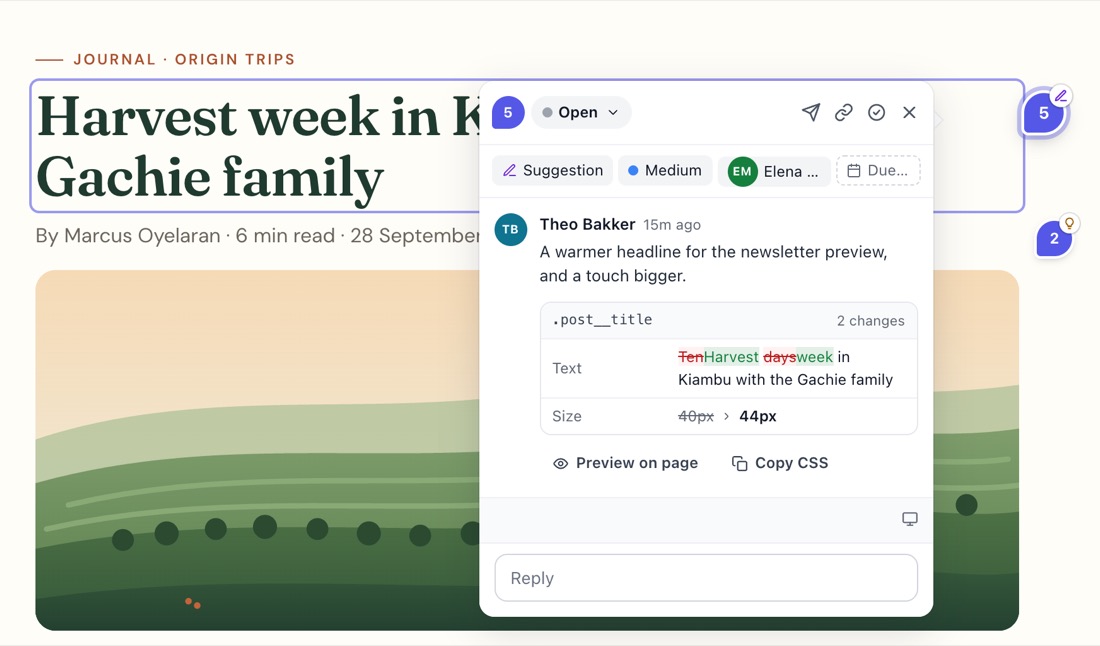
Press Shift+S, or pick Suggest an edit from the toolbar, then click an element. A panel opens with a group for each kind of change, so you open only what you need:
- Text: type straight on the page. Links and bold words stay as they are; only the words change.
- Colours, and Font and size: text colour, background, opacity, font, size, weight, line height, letter spacing and alignment. The panel shows the colours already used on the page, so you pick from the site's own palette.
- Space and size, and Border and shadow: margin and padding, width and height, gap, border, radius and shadow.
- Remove it: suggest hiding the element, for "remove this" feedback.
You see the result on the live page as you go. Add a line on why, if it helps. When you save, StiqNote attaches a before and an after screenshot.
What the developer gets
The thread shows the change three ways:
- Before and after screenshots, side by side.
- Copy CSS: the exact CSS change, ready to paste.
- Text: the old and the new words.
When it's done, they click Mark applied. The sidebar can also preview every suggestion on the page at once, so you can check how they look together.
If the page changed since the suggestion was made, StiqNote says so, and the screenshots still show what was meant.
For AI coding agents
Through the MCP server, an agent can ask for a suggestion as a ready CSS patch plus the text replacements, each with the selector it applies to. It applies them to your code and marks the suggestion applied. See bug reports for AI agents.
Who uses this
- Copywriters and content teams fixing words on the page they'll appear on.
- Designers checking the build against the design: "12px more space here, and this grey is too light."
- Your team, before the client sees it. Text comments and Suggest an edit are for team members. Guests comment with pins and areas.
Questions
Does Suggest an edit change my website?
No. The change only shows in your browser while you make it, and as a preview for your team. Someone still has to make the change in the site's code or CMS.
Is Suggest an edit on the Free plan?
No, it's part of Pro and Agency. Comments on selected text are free.
Can I suggest edits on any website?
Yes, on any page where StiqNote runs. It works best on normal HTML text. Text drawn inside images or canvases can't be edited.
Related features
Stop sending screenshots in Slack
Pin the feedback where it belongs. Free to start, with 14 days of Agency for your first team.