Feature
From feedback to done, without a second tool
StiqNote isn't a project management tool, and it doesn't try to be. But feedback needs an owner and a finish line. So every thread has the few things that get it done, and nothing that turns reviewing into admin.
Free for 3 people. 14 days of Agency, no card.
Every thread has
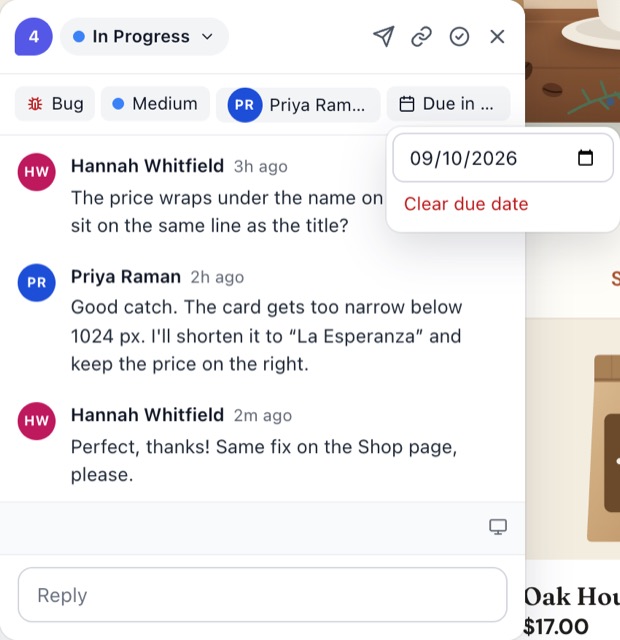
- A status: Open, In Progress, In Review or Resolved, in any order.
- A priority: Low, Medium, High or Critical.
- An assignee, picked while you write or later.
- A due date.
- A type: Comment, Bug, Idea, Question, Warning, Copy edit or Suggestion. You can change it after posting.
All of this is on every plan, including Free.
Find what's yours
In the sidebar, the Comments tab lists every thread on the page, grouped by status. Filter by type, device, author, assignee or due date, and sort by newest, oldest, priority, due date or position on the page. Hide the pins of one status from the page with one click, and delete all resolved comments when a page is done.
The Pages tab shows every page with feedback, across all your sites, with what's open and what's assigned to you. The For you filter shows only your pages.
The Inbox
Replies to you, @mentions and assignments land in the Inbox. Filter it to mentions or assignments, mark things read, and click through to the pin. With desktop alerts on, Chrome tells you while it's open.
Email that doesn't flood you
- The email summary collects replies, mentions and assignments. Choose hourly, daily or weekly, or turn it off.
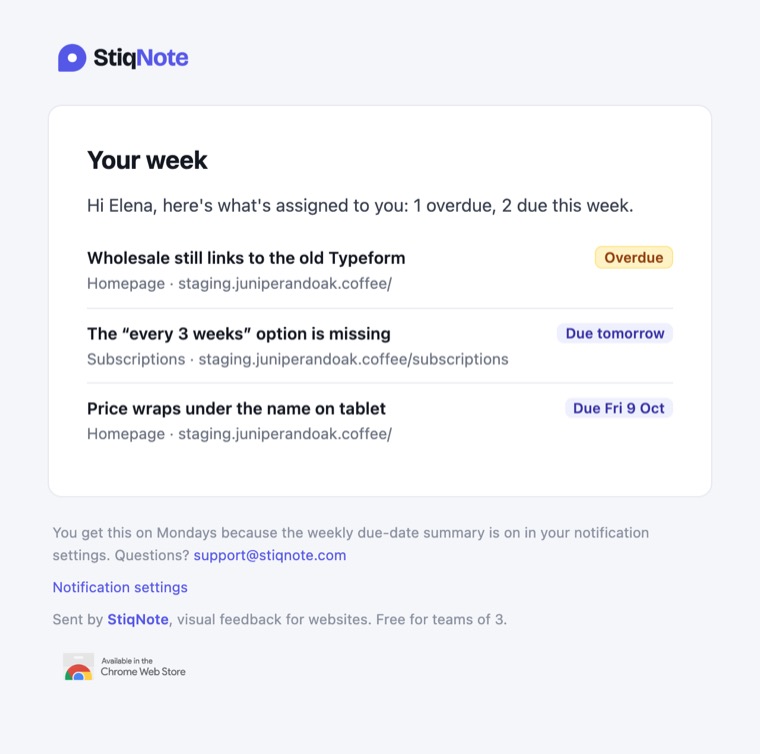
- Due soon and overdue. The first summary of the day leads with the threads assigned to you that are overdue or due within the week.
- "Your week": on Monday morning, an email with what's due that week, if you have anything due. Turn it off in Settings → Notifications ("Weekly due-date summary").
Reactions and status changes can go in the summary too, or stay out. You choose in Settings → Notifications.
Live, for everyone
New pins, replies and status changes appear for everyone on the page as they happen. You see who's typing. No refresh.
When you need more
If your team runs its work in GitHub, Linear, Jira or Asana, send threads there on Pro. Status syncs both ways, and replies can too. StiqNote stays the place for feedback on the page; the tracker stays the place for the work. See integrations.
Questions
Are due dates on the Free plan?
Yes. Statuses, priority, assignees, due dates and @mentions are on every plan.
What time does "Your week" arrive?
On Monday morning, from 08:00 UTC. StiqNote doesn't store your time zone yet, so it's the same time for everyone.
Can I have a Kanban board?
No. StiqNote keeps four statuses on purpose. If you want a board, send threads to the tool you already use for it.
Related features
Stop sending screenshots in Slack
Pin the feedback where it belongs. Free to start, with 14 days of Agency for your first team.