Feature
Annotate any website, pin by pin
Click the spot, write the note. That's how you annotate a website in StiqNote: pins stick to the exact element, not a point on the screen, so the note stays right when the layout moves.
It works on any page Chrome can open: production, staging, a preview link or localhost. Nothing to install on the site.
Free for 3 people. 14 days of Agency, no card.
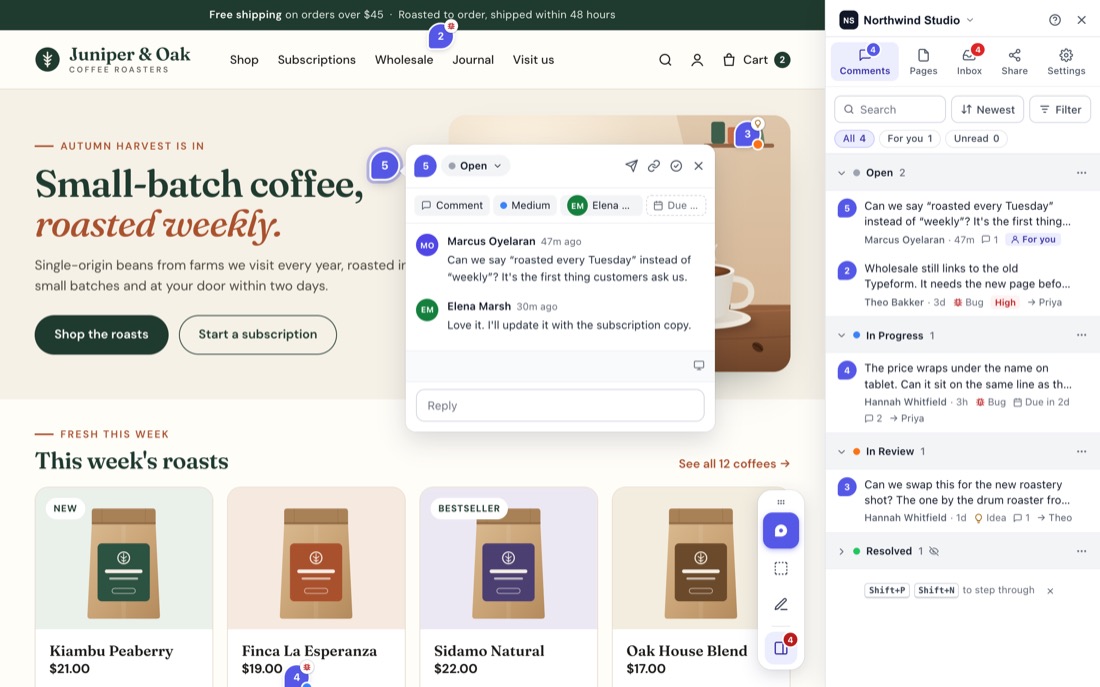
Two ways to point at something
Pins. Press Shift+C, or click Add comment on the StiqNote toolbar, then click the element you mean: a button, a heading, an image. The pin sits on that element.
Areas. Press Shift+A and drag a box around a whole section, like a hero or a pricing table. While you write, you can move the box and drag a corner to resize it. Arrow keys nudge it.
Both are on every plan, including Free.
Want to comment on a sentence? Select the text and press C. See comments on text.
Notes that stay where you put them
Pages change. A new banner pushes everything down, a column wraps on a smaller screen. StiqNote keeps each note on its element:
- It remembers the element in several ways (its id, test attributes, its place in the page) and a fingerprint of what it looked like, so it can find it again after a redesign.
- The pin keeps its spot inside the element, so it stays on the same word or corner at every screen size.
- Pins follow sections that scroll on their own, and hide when their spot scrolls out of view.
- An area keeps the box you drew, around the same elements.
If StiqNote can't find the element any more, the note still shows, marked as approximate, so nothing gets lost.
Menus, pop-ups and hover states
Some things only show while your mouse is over them. Click Freeze in 3s (or press Alt+F) to freeze the page, then open the menu and comment on it. You can also hold Alt while you click.
Later, when someone opens that comment, StiqNote tells them the spot is inside something that's closed, so they know to open it.
From the keyboard
Every pin can be placed without a mouse. In comment mode, Tab moves between elements and Enter places the pin. Shift+N and Shift+P step through the comments on a page.
Everything a note needs
Each comment can have:
- a type: Comment, Bug, Idea, Question, Warning, Copy edit or Suggestion;
- a priority, from Low to Critical;
- an assignee and a due date;
- a screenshot you can mark up, and files;
- @mentions for teammates, or everyone at once.
Browser, operating system, window size, screen size and zoom are saved with every comment, so the developer sees what you saw.
The whole team sees it live
New pins and replies show up for everyone on the page as they happen, and you see who's typing. Pins are numbered in the order they were made, and the same numbers show in the sidebar, so "see 4" means the same thing to everyone.
The sidebar lists every comment on the page. Filter by type, author, device, assignee or due date, and sort by newest, priority, due date or position on the page. The Pages tab shows every page with feedback, across all your sites.
Try it without installing
The home page has a live demo. It runs StiqNote on the page itself. No account, and nothing is sent anywhere.
Questions
Does it work on staging and localhost?
Yes. If Chrome can load the page, you can comment on it. That includes password-protected staging sites you're signed in to, and localhost.
Which browsers does it work in?
Chrome, Edge and Brave. Other Chromium browsers such as Arc and Opera can install it, but they don't fully support Chrome's side panel, which the sidebar uses. Guests reviewing through a guest link can use any browser.
Does it add anything to my website?
No. StiqNote runs in the browser of the person commenting. You don't add a script or a plugin to the site.
Can I comment inside an iframe?
Not yet. Pins go on the page itself, not inside embedded frames.
Related features
Stop sending screenshots in Slack
Pin the feedback where it belongs. Free to start, with 14 days of Agency for your first team.