For marketing and content
Review and approve web pages where they'll be read
A landing page goes through a lot of hands: the copywriter, the designer, legal, the product owner, sometimes an agency. Feedback on a Google Doc doesn't show how it looks. Feedback in email doesn't say where.
With StiqNote, everyone reviews the real page and comments on the exact words.
Guests are free on every plan. No card for the trial.
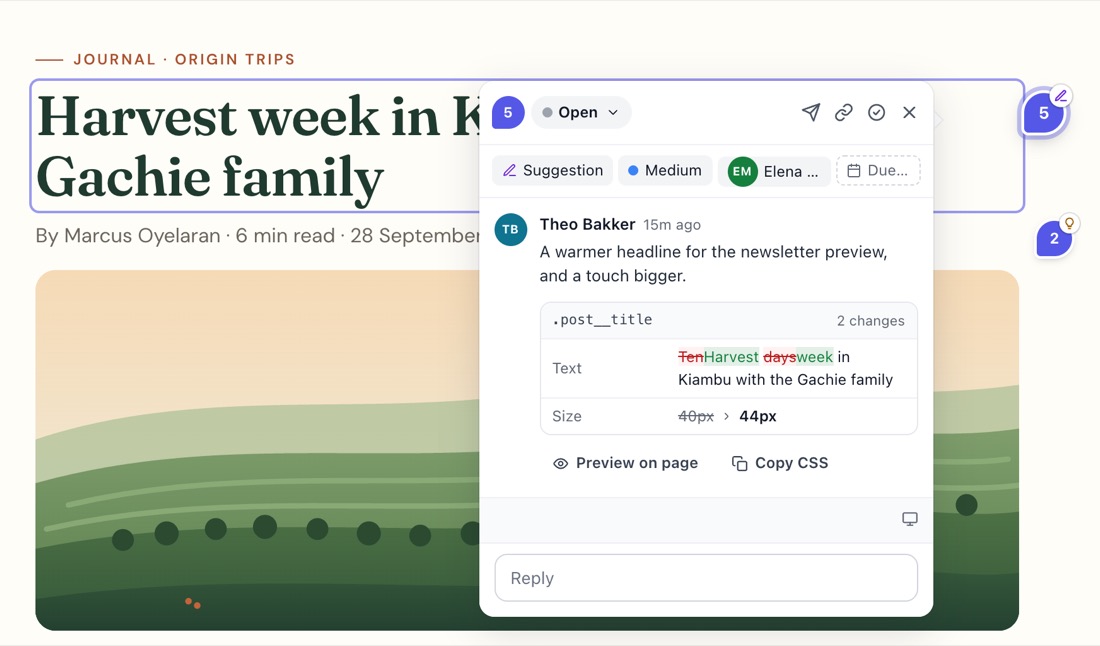
Comment on the words
Select a sentence and press C. The words are quoted in the comment and highlighted on the page, so "this line" is never ambiguous. Pin a note on an image or a button, or draw a box around a whole section. Text comments.
Suggest the new copy Pro
Type the new wording straight on the page with Suggest an edit. Your team sees before and after, and the web team gets the exact text change. Also works for colours and spacing.
Stakeholders without the setup
Send stakeholders outside your team a guest link. They open the page in any browser, confirm their email, and comment. They're free and unlimited, and they see only the sites you share. Guest links.
Mark internal notes private, and stakeholders won't see them.
Approvals, page by page Agency
Start a review round for the site, or for the pages you pick (from the sitemap, or pasted in). Each reviewer approves a page or asks for changes. Choose whether one approval is enough or everyone must approve. StiqNote keeps who approved what and when, sends reminders, and keeps the history of every round. Client sign-off.
Keep launches on track
- Due dates on every thread, and a Monday "Your week" email with what's due.
- Assign each note to the writer, the designer or the developer.
- The Pages tab shows what's still open across every page and site.
- Post new feedback to a Slack channel on Pro, so nothing waits for someone to open the page.
Honest limits
- StiqNote reviews live web pages. For Word documents, PDFs or design files, you need another tool.
- It doesn't publish to your CMS. Approved copy still has to go into WordPress, Webflow or wherever the page lives.
- Pages that only exist in a CMS preview behind a login need the extension to review; the no-install view serves public pages only.
Questions
Can we review a page before it's public?
Yes, with the extension: any page your browser can open, including CMS previews and staging. Reviewers without the extension need a public address.
Does it work with WordPress, Webflow or Shopify?
Yes. StiqNote works in the browser, so it doesn't matter what the site is built with. Nothing is installed on the site.
Stop sending screenshots in Slack
Pin the feedback where it belongs. Free to start, with 14 days of Agency for your first team.