For designers
Design QA where the design lives now: the browser
The design was right in Figma. Then it was built, and the spacing is a bit off, the grey is too light, and the heading wraps on tablets. Describing that in a ticket is slow, and it still gets misread.
StiqNote lets you point at the element, or change it right on the page and hand over the exact change.
Guests are free on every plan. No card for the trial.
Suggest an edit Pro
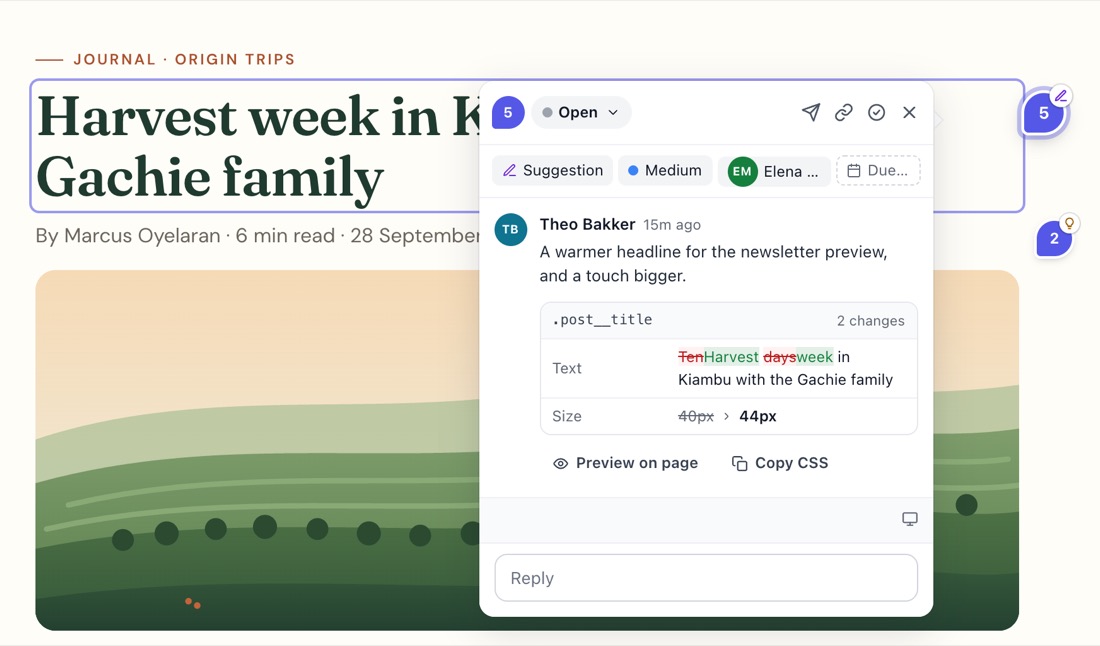
Press Shift+S and click an element. Change it on the live page:
- Colours and Font and size: text colour, background, opacity, font, size, weight, line height, letter spacing, alignment.
- Space and size and Border and shadow: margin, padding, width, height, gap, border, radius, shadow. Or Remove it, to suggest hiding the element.
- Text: type the new words straight on the page.
The panel shows the colours already on the page, so you pick from the site's own palette. When you save, StiqNote attaches before and after screenshots. The developer gets the change as CSS they can copy, and marks it applied when it's in. Suggest an edit.
Pins, areas and markup (every plan)
- Pin a note on the exact element. It stays there when the layout moves.
- Draw a box around a section that's off as a whole.
- Attach a screenshot and mark it up: arrows, shapes, numbered callouts, blur.
Every note saves the window size, so "at tablet width" is recorded, not guessed.
Preview everything at once
The sidebar can show all suggestions on the page at the same time, so you can see whether the changes work together before anyone codes them.
Works with developers and their agents
Send a suggestion to GitHub, Linear or Jira on Pro, or let a developer's AI coding agent pick it up through the MCP server as a ready CSS patch.
Honest limits
- StiqNote doesn't review Figma files, images or PDFs. It's for the built website.
- No side-by-side design overlay: you compare with your design yourself.
- Suggest an edit changes the page only in your browser. Someone still makes the change in the code.
Questions
Is Suggest an edit on the Free plan?
No, it's on Pro and Agency. Pins, areas, text comments and screenshots are free.
Can clients use Suggest an edit?
No. It's for your team members. Clients comment with pins and areas.
Stop sending screenshots in Slack
Pin the feedback where it belongs. Free to start, with 14 days of Agency for your first team.