Feature
Clients comment without installing anything
Your clients won't install a browser extension to tell you the logo is too small. They don't have to.
Send the no-install guest link. They open it in any browser, confirm their email with a 6-digit code, and click on the page to comment. Their notes show up for your team on the exact spot, straight away.
Free for 3 people. 14 days of Agency, no card.
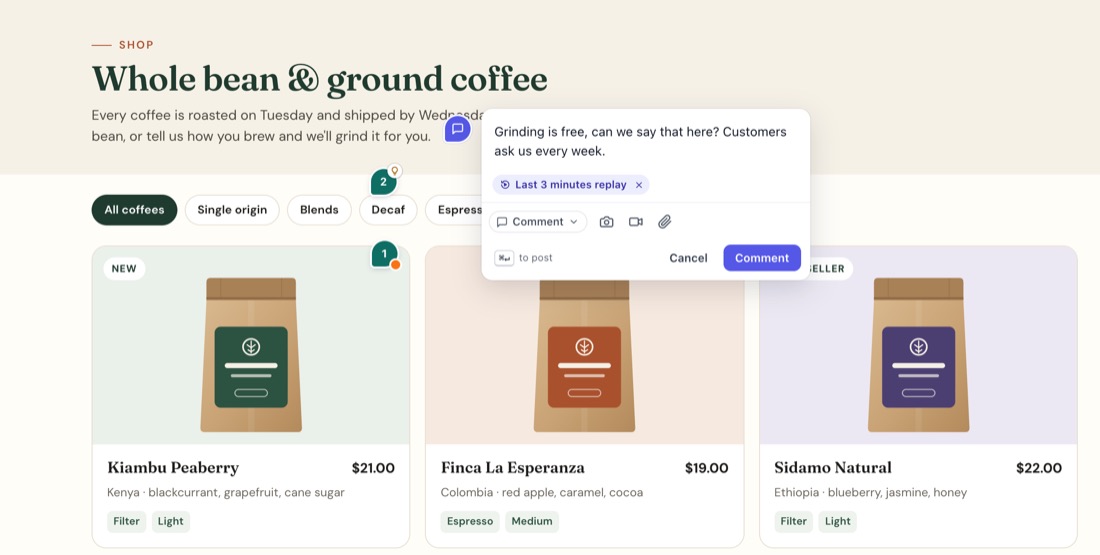
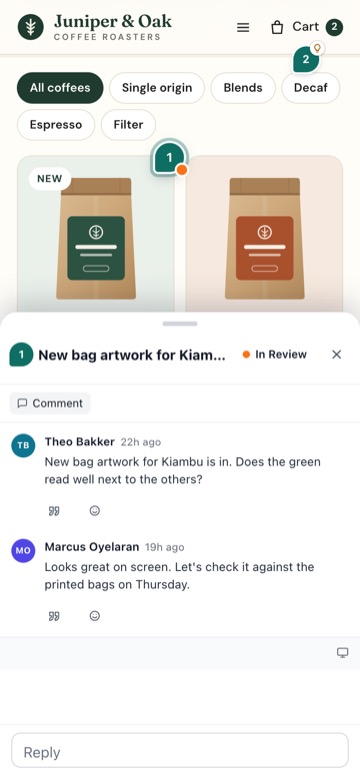
How it works for your client
They open the link you sent.
They type their email and get a 6-digit code. No password, no account to set up.
The site opens with a small StiqNote bar. They click anything to leave a comment and reply to yours.
It works in any modern browser: Chrome, Safari, Firefox or Edge.
How it works for you
In the StiqNote sidebar, open Share and invite. Under No-install link, click Create link for the page you're on and pick how long it works: 7 days, 30 days or always. Copy it and send it however you like: email, Slack, your project tool.
You can extend a link, or turn it off. Turning a link off stops new people from joining; guests who already joined stay on the team until you remove them.
Guests only see what you share
- The no-install guest link shows one site: the one you made it for. An email invite gives the whole project, every site in it, and needs the extension.
- Private notes stay with your team. Guests never see them, in the page, in live updates or in emails.
- Guests can comment, reply, and edit or delete their own comments. They can't invite people or make links.
- You change which sites a guest can see, or remove them, in Settings → Team.
Free and unlimited
Guests never count as members. Invite every client, every stakeholder, every copywriter, on every plan, including Free.
What the no-install view can't do
The guest view opens your site through StiqNote's review address (<link>-view.stiqnote.com). To keep your site and your guests safe, it:
- serves public pages only;
- never passes on the guest's cookies or passwords, and turns off password fields;
- doesn't submit forms: signing in, checking out or sending a contact form won't work there.
So a staging site behind a login, or localhost, can't be reviewed this way. For a site behind a login, guests who have the extension use the same link: it opens the real site in their own browser, where they're signed in. For localhost, invite them by email and have them use the extension.
Comments from the guest view carry the browser details. Console logs and session replays only come from people using the extension.
Site owners If you own a site and don't want it shown through the review address, email support@stiqnote.com and we'll block it.
Let clients approve the work Agency
On Agency, a guest link can be the start of a review round. Clients go through the pages and approve each one, or ask for changes, and you see who said what, and when. See client sign-off.
Put your brand on it Agency
On Agency, clients see your logo, colour and name on the review page, the guest bar and the emails they get. See white-label branding.
Questions
Do clients need a StiqNote account?
They confirm their email once with a code, which creates a guest account behind the scenes. They never set a password.
Can a client use the extension instead?
Yes. Clients who already use StiqNote open the same no-install guest link: it opens the real page in the extension, and they join as guests of your team in the same way.
What does the client see on the site?
Your site, as it is, with a small bar that says who they're reviewing it for, and the pins your team and other guests left that they're allowed to see.
Does the no-install guest link add anything to my website's code?
No. Nothing is added to your site. The guest view adds StiqNote to the page as it's delivered to the guest, not on your server.
Related features
Stop sending screenshots in Slack
Pin the feedback where it belongs. Free to start, with 14 days of Agency for your first team.